Microsoft now rolling out Xbox Full Screen Experience to all PCs

It doesn't matter the device.
Xbox just announced recently that they are bringing the full screen experience to all PCs through a new view in Windows. This comes after the announcement of the Xbox Full Screen Experience that launched recently just for handheld PCs. This is very good news, as it will allow for a Steam-Big-Picture-esque experience for home theater PCs for people who prefer the Xbox OS and feel.
When you hover over the Task View button on the Task Bar, a new option will pop up alongside the previous options for Virtual Desktops. You can also get to this view by clicking Alt+Tab. You can also turn off the experience outright in Windows Settings > Gaming > Full Screen Experience.
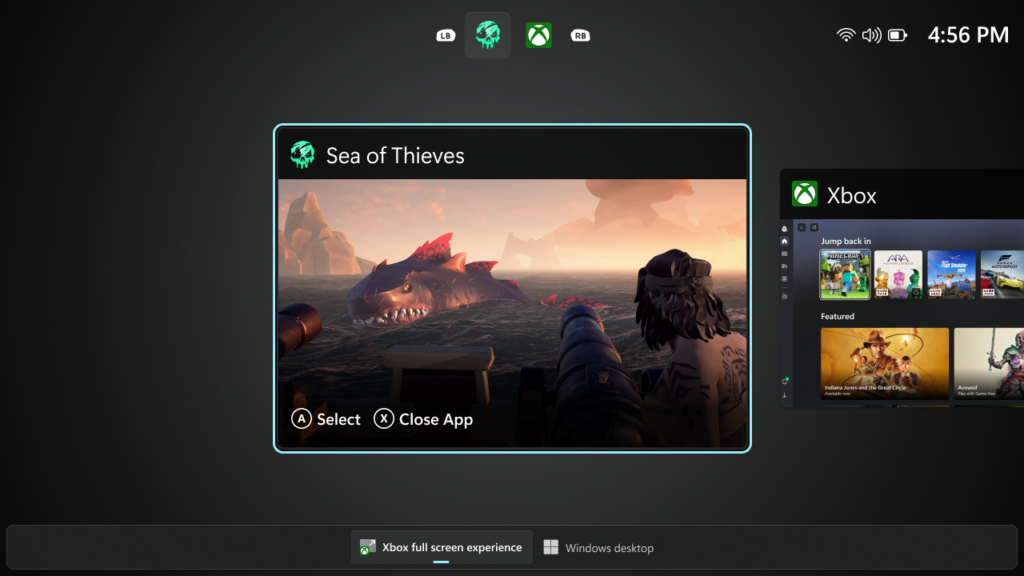
Microsoft also clarifies that there is "no reboot required" to switch back into Desktop mode - just click the Windows Key or choose the Windows Desktop option in the bottom bar when you "long press on the Xbox button on your controller or on your keyboard."
All your games will be very accessible and easy to navigate to, just like on Xbox FSE on handhelds. This is all very good news, as it shows that Microsoft and Xbox care about the PC gaming experience and are putting time and effort into making it feel good for everyone.
The Xbox Full Screen Experience is a great new way to navigate through games on Windows. We will have to wait and see what Microsoft does soon.